What Rotahr actually looks like
Real screens from a live venue, not mockups. This is the demo site “The Anchor & Tap” — a 20-seat gastropub with ten staff, a full week of shifts, a service worth of bookings, stock, suppliers and food safety records already in it.
You can walk the whole thing yourself without giving us anything. The demo resets itself, so nothing you click matters.
01 · Employee scheduling · labour cost management
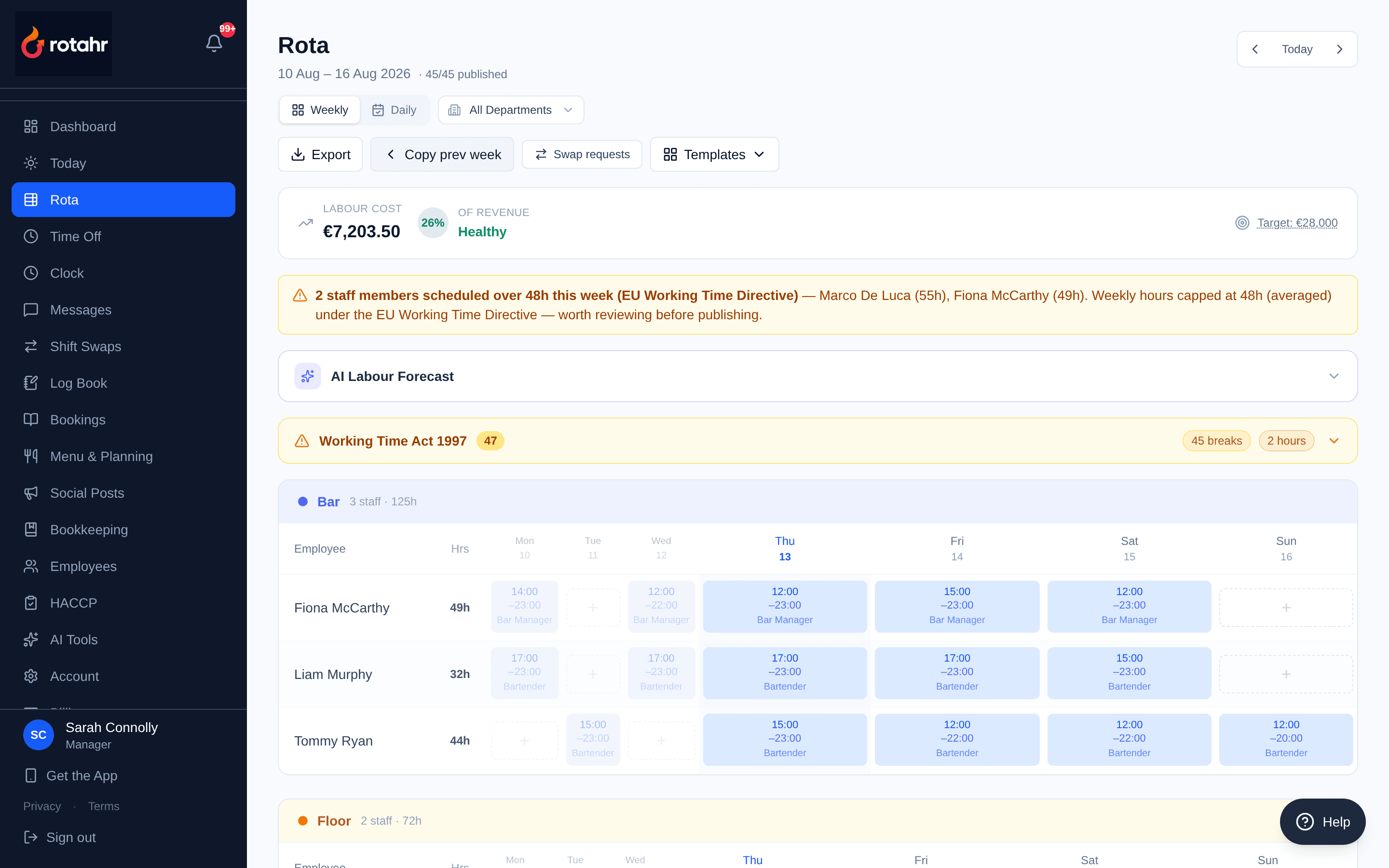
Rota and labour cost
The week for one venue, staff down the side and days across. Wage cost recalculates as shifts move, so going over budget is something you find out while you can still change it, not on payday.
- Shifts assigned per employee per day, with roles
- Running labour cost against the schedule
- Publish to staff phones; swaps and time off route to a manager
02 · Table management · reservations
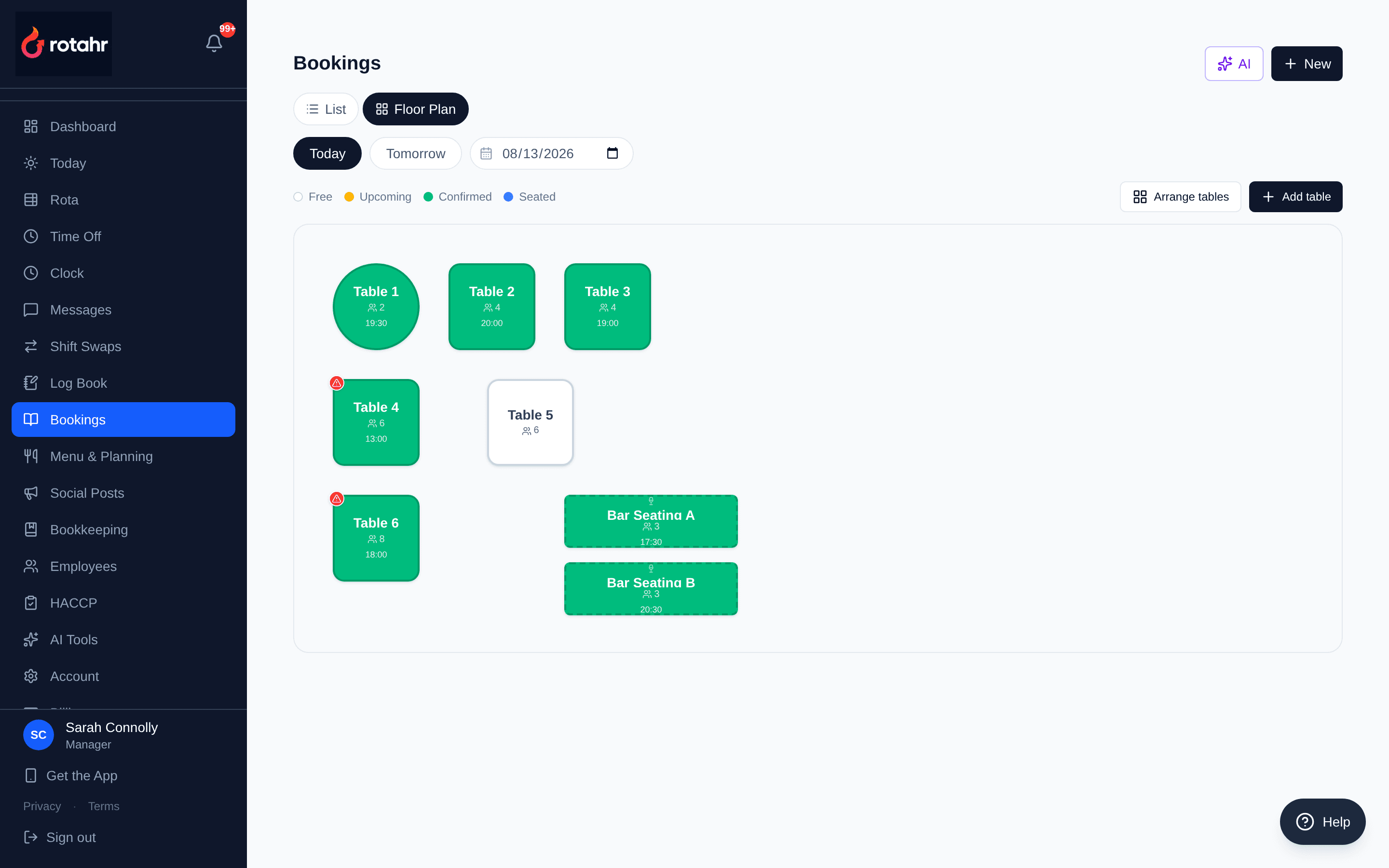
Table floor plan
Tables laid out to match the actual room — placed, shaped, sized and given a capacity. Colour is live status for the date you are looking at. Clicking a free table opens a booking already assigned to it.
- Named tables with covers and shape (round, square, rectangle, bar seating)
- Free / upcoming / confirmed / seated shown per table
- Click-to-book against a specific table
03 · Reservations management
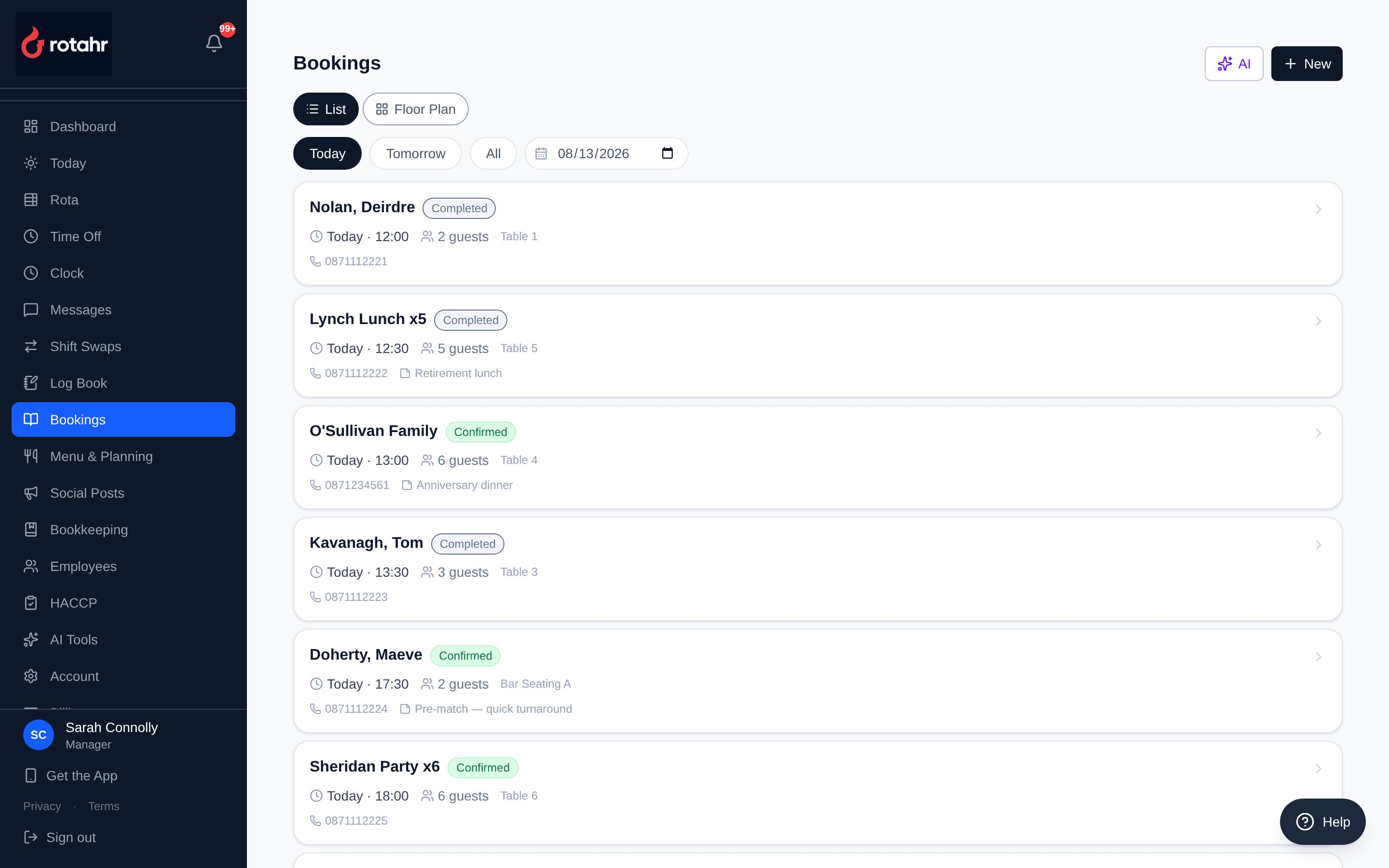
Reservations
The same day as a list, which is what you want on a busy service. Reservations come in from the public booking page, by phone, or from a walk-in, and guest profiles build themselves as people return.
- Party size, time, table, contact details and notes per booking
- Status flow through the service
- Guest history and no-show record carried forward
04 · Food safety compliance
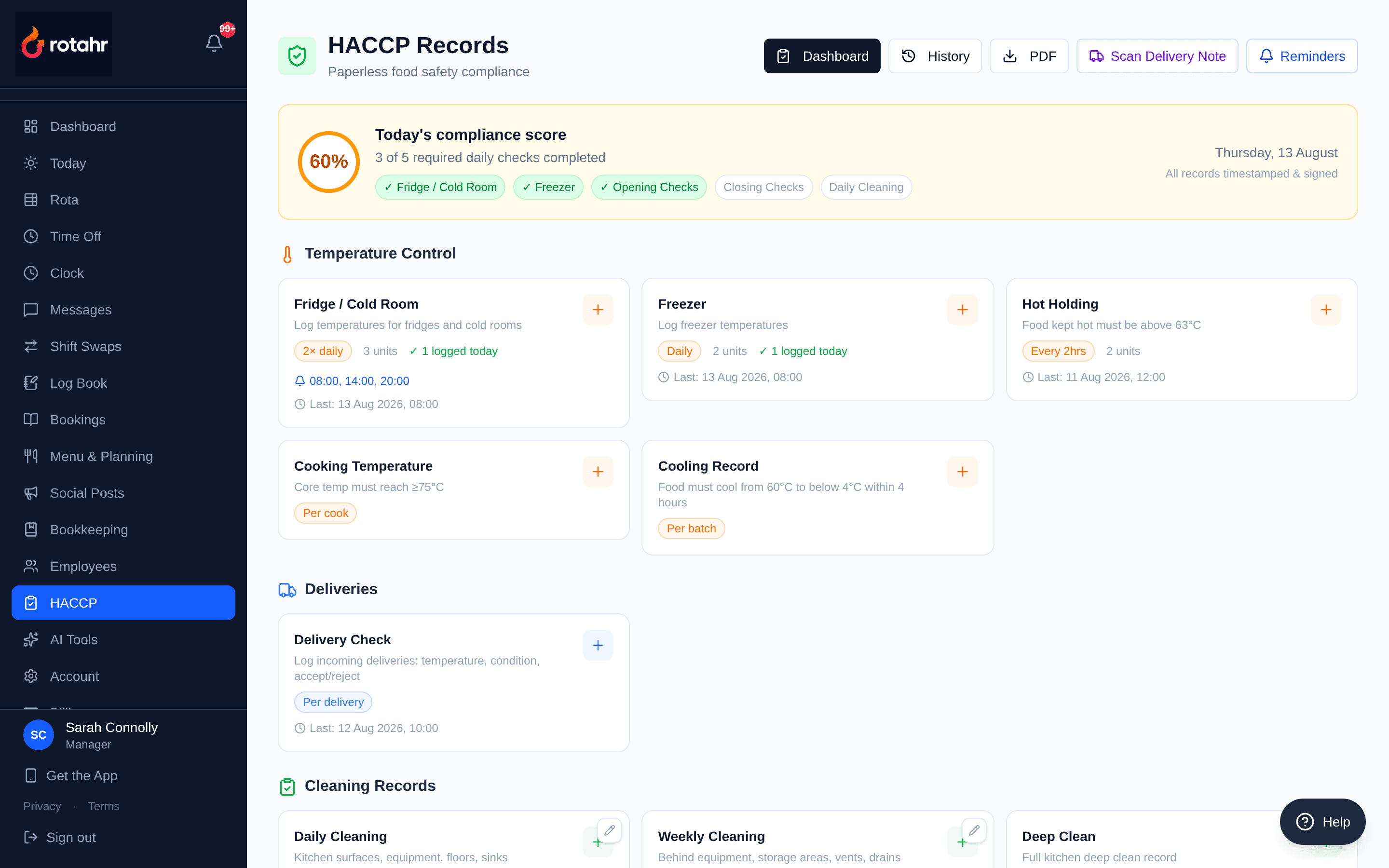
HACCP food safety records
Temperature checks against your own named fridges, freezers and hot holding units. Cooking and cooling records with the thresholds built in. Reminders follow the shift and repeat until the check is logged, and the inspection pack exports as a PDF.
- Per-equipment temperature logs with pass/fail thresholds
- Opening, closing and cleaning checklists, editable per venue
- Compliance rate and outstanding checks visible at a glance
05 · Inventory management
Stock list
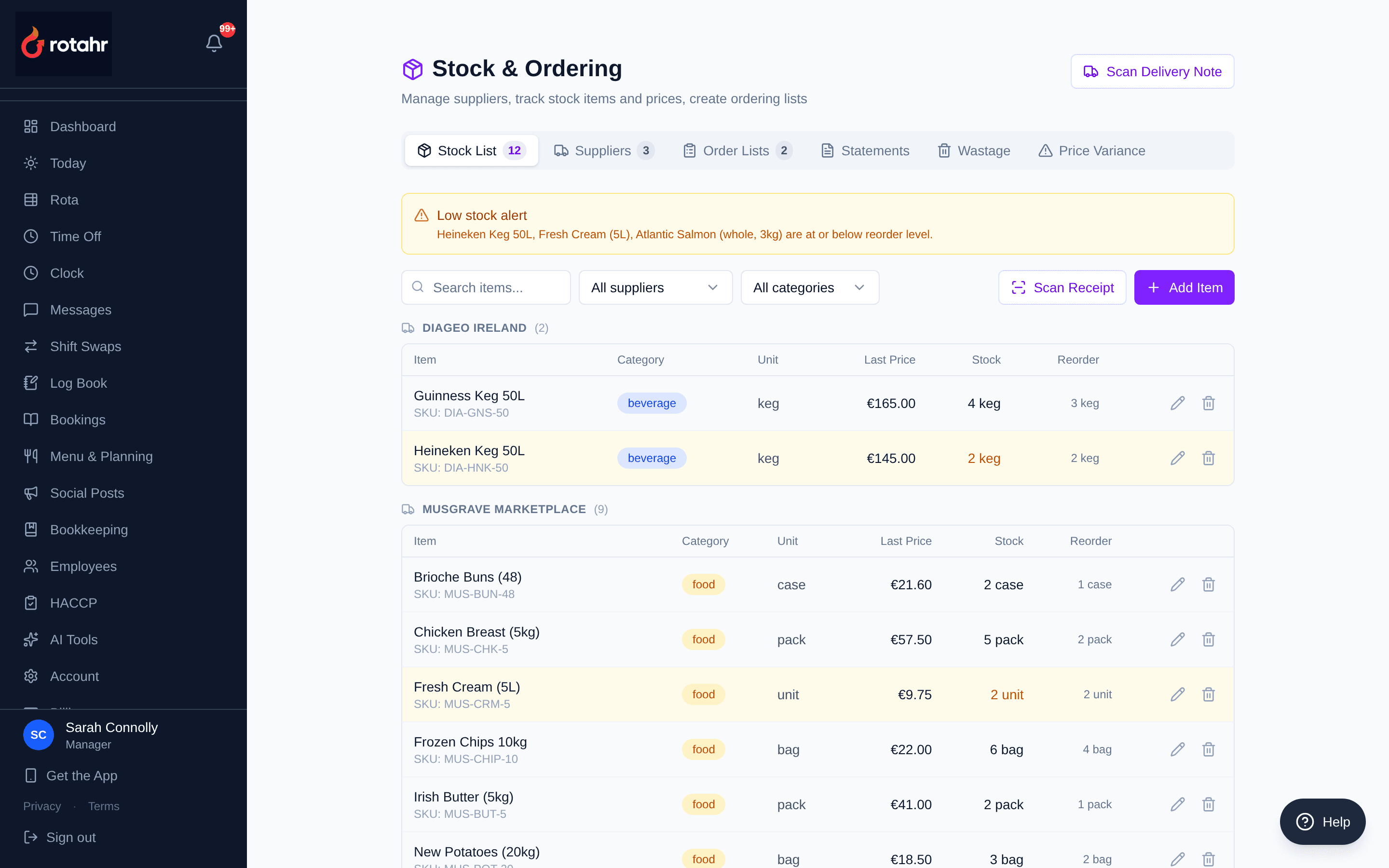
Every stock item with its supplier, pack size, last paid price, reorder level and current level. Pack size matters: a 5kg box at €98 is €19.60 a kilo, and that is the number recipe costing uses.
- Current stock against reorder level per item
- Last price paid, per supplier, with pack size and unit
- Categories, SKUs and price variance tracking
06 · Order management (purchase orders to suppliers)
Supplier purchase orders
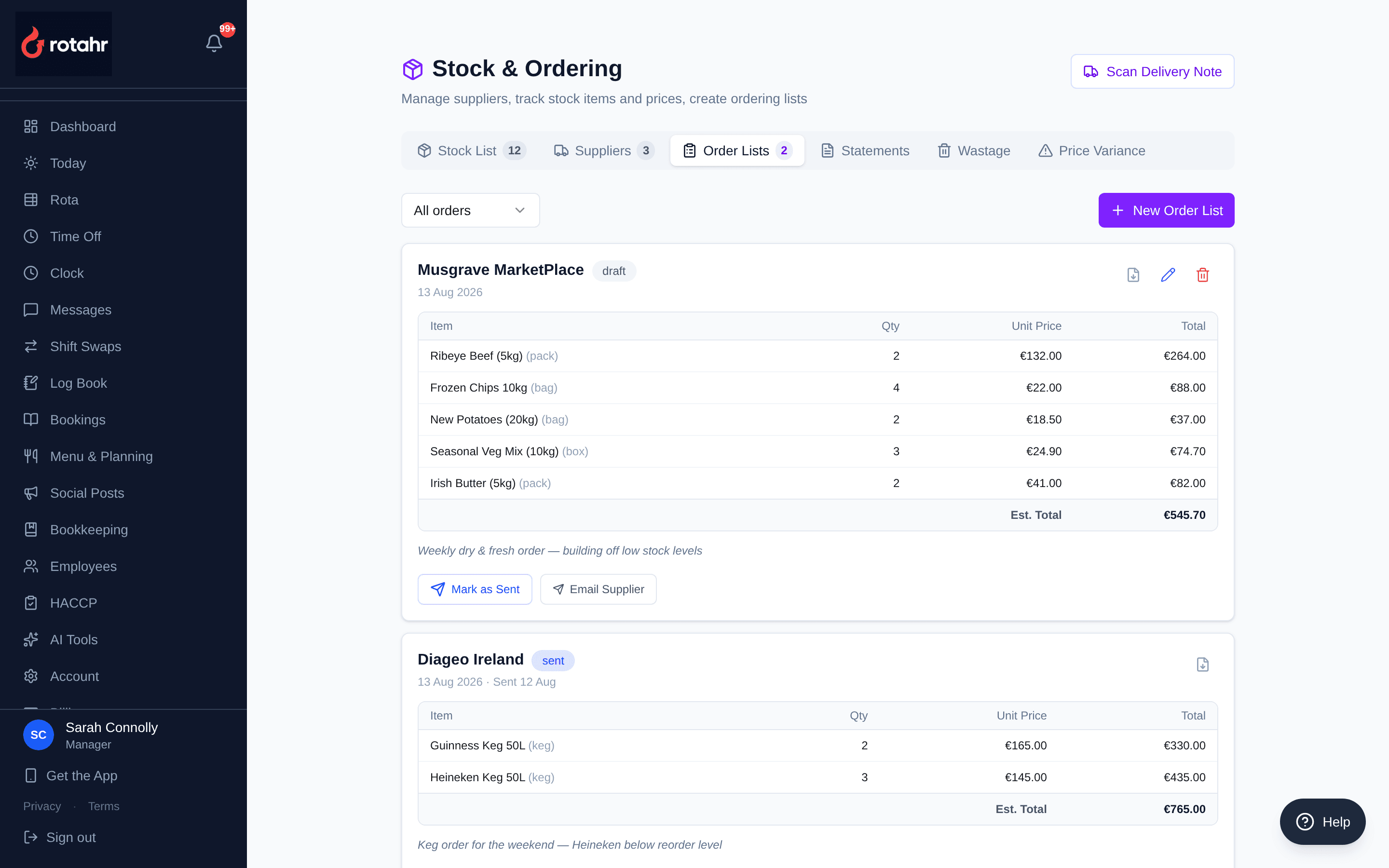
Order lists built per supplier off what is actually low, with quantities, unit prices and an estimated total. Each one moves draft to sent to received, and can be emailed to the supplier from here.
- Line items with quantity, unit price and order total
- Status lifecycle: draft, sent, received
- Email to supplier and export
07 · Vendor management
Suppliers
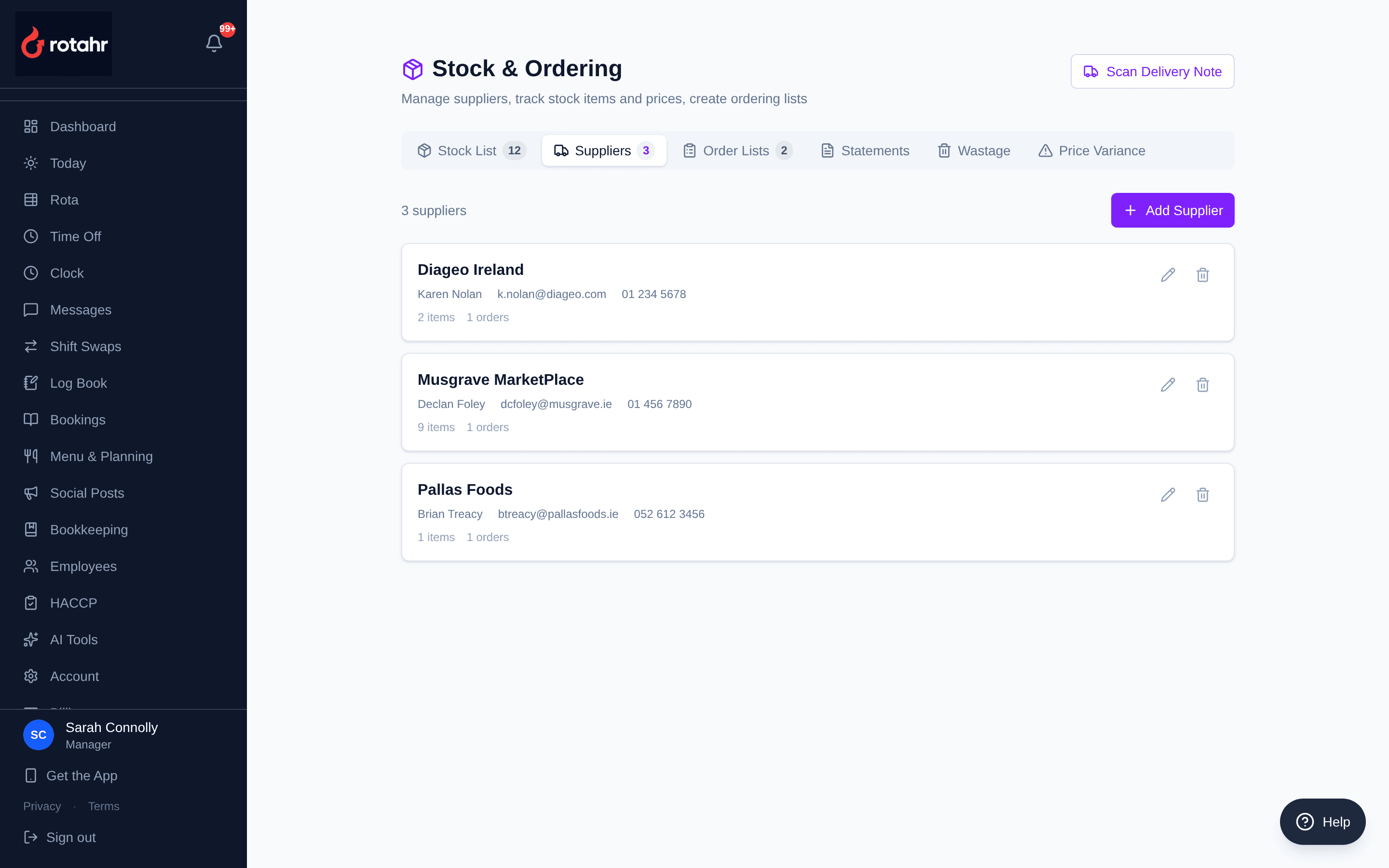
Your supplier list with the contact who actually answers, tied to the stock items and orders that belong to each one.
- Contact name, email and phone per supplier
- Linked stock items and order history
08 · Accounting · accounts payable
Supplier statement reconciliation
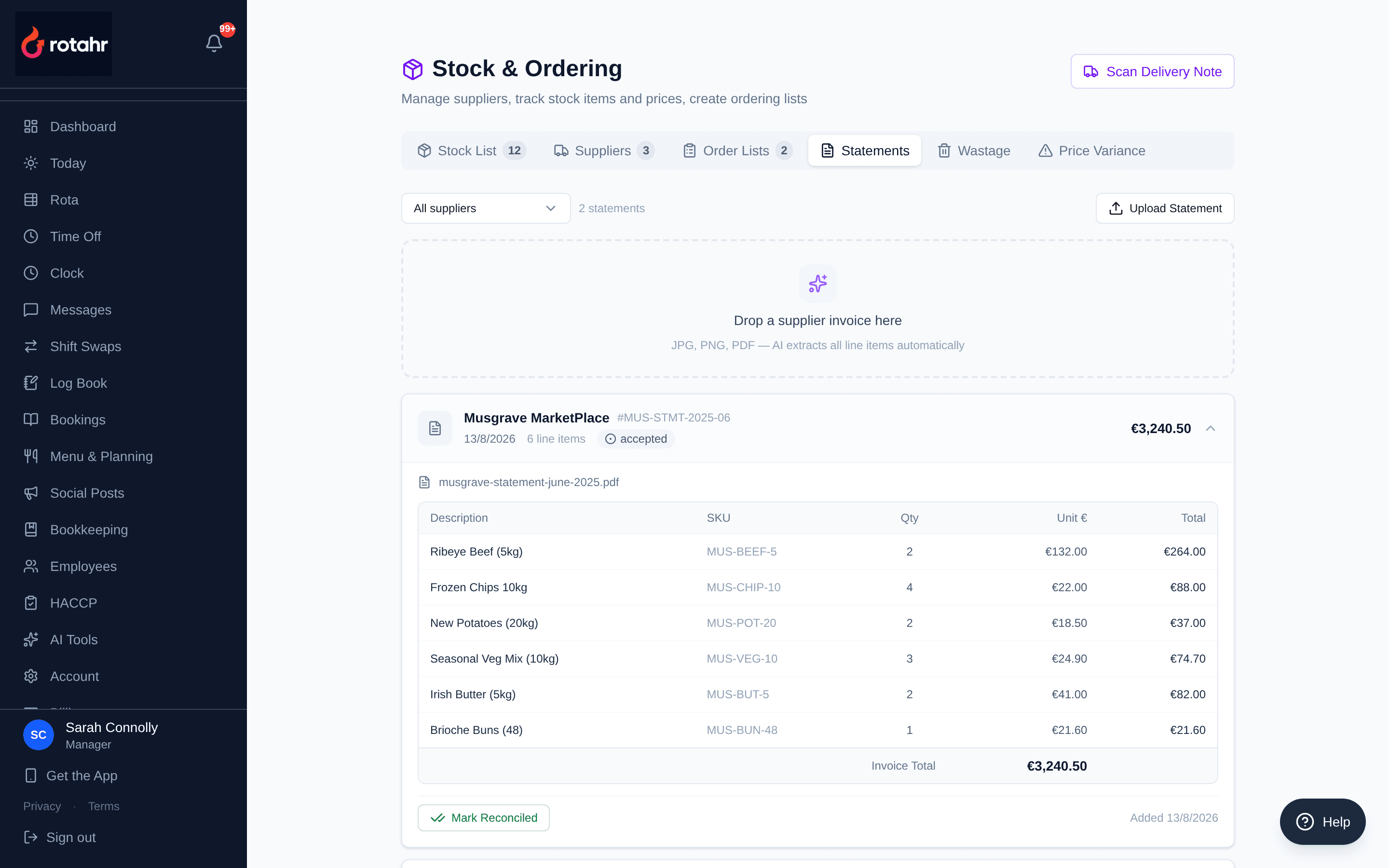
Upload a supplier statement and it is read and matched against what you ordered and received. Discrepancies are flagged rather than found three months later.
- Statement lines matched to orders
- Status per statement: pending, matched, discrepancy, accepted
- Feeds the expense record, profit and loss, and tax summary
09 · Recipe and menu costing
Recipe costing and gross margin
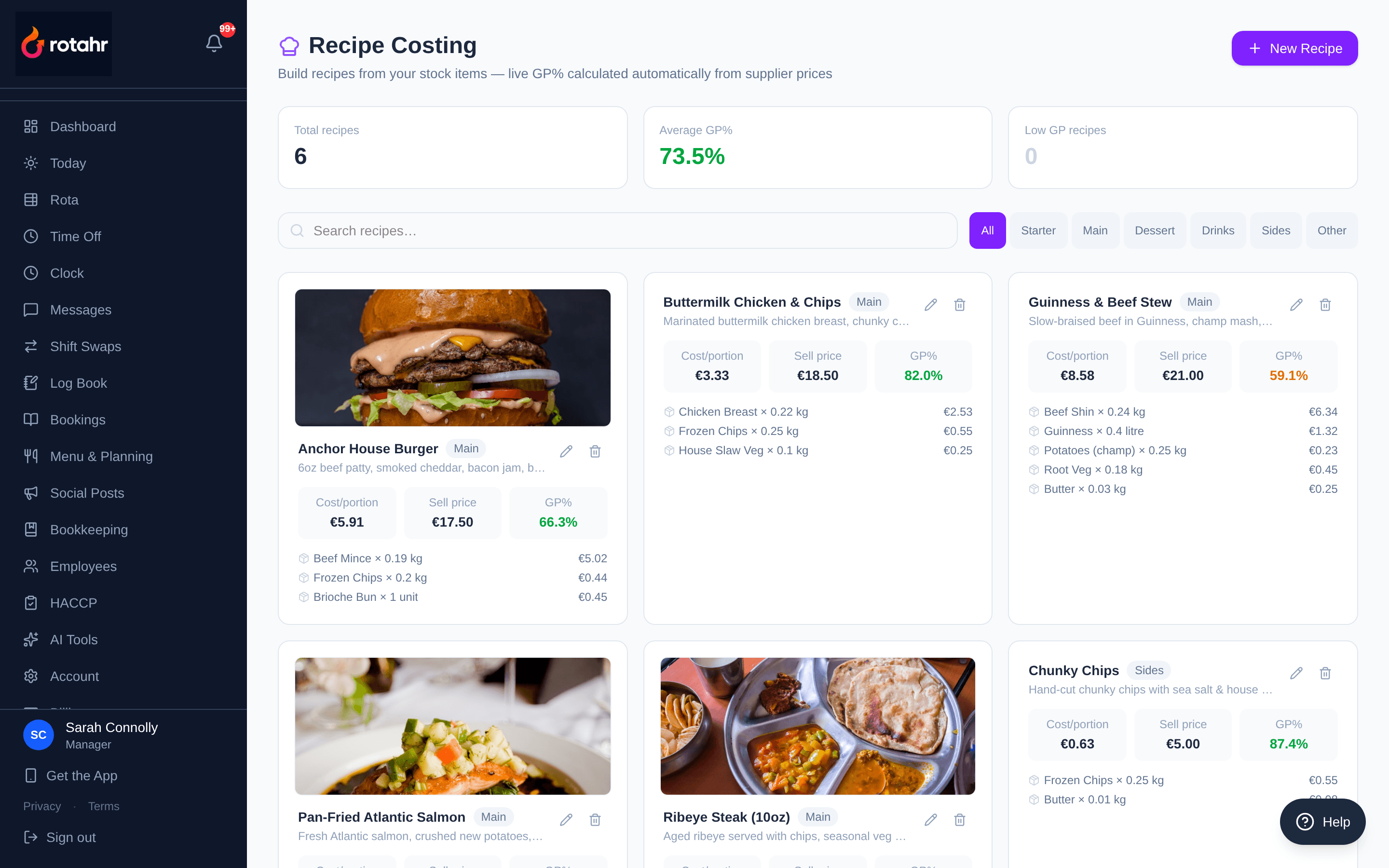
Each dish built from stock items, costed on the prices that actually landed. When a delivery comes in dearer, the gross margin on the dish moves the same day — so the specials board is priced on this week's beef, not last quarter's.
- Cost per portion, sell price and GP% per dish
- Ingredient quantities with their individual costs
- Low-GP dishes surfaced automatically
10 · Reporting and analytics · operations insights
Manager Copilot daily brief
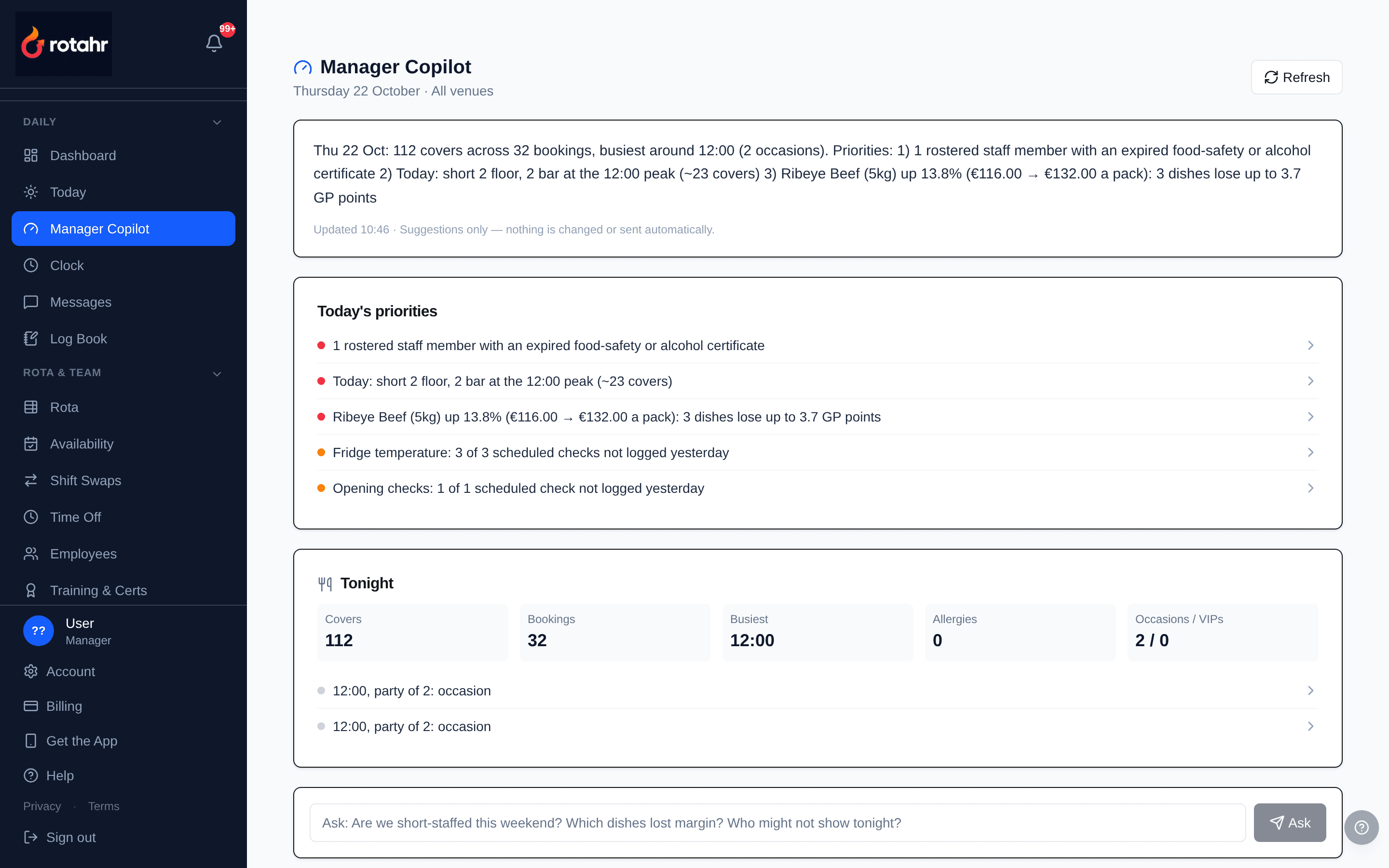
One page that reads the rest of the system: the HACCP checks nobody logged, the supplier price rise that took GP off the ribeye, the noon peak the rota is short for, and tonight's covers at a glance. Every line links to the screen where it gets fixed. It suggests; it never changes anything itself.
- Today's five priorities across compliance, margin, waste, bookings and no-shows
- Supplier price rises re-costed against a target GP (70% by default)
- Ask box for plain-English questions about the venue's own data
Capability map
Software directories check restaurant and hospitality products against a fixed list. Here is that list against Rotahr, including the one Rotahr does not meet — it is easier for everyone to have that on the page.
| Capability | In Rotahr | Where |
|---|---|---|
| Employee management and scheduling | Yes | Rota, clock-in, time off, payroll hours |
| Inventory management | Yes | Stock list, levels, reorder points, wastage |
| Order management (supplier purchase orders) | Yes | Order lists, draft → sent → received |
| Reservations and table management | Yes | Floor plan, bookings, guest CRM |
| Accounting | Yes | Expenses, supplier statements, P&L, tax summary |
| Point of sale | No | Not built. Rotahr sits alongside your till |
What Rotahr is not
Rotahr is not a point of sale. It does not process customer payments and it does not take orders at the table. “Order management” above means purchase orders to your suppliers, not customer orders. Rotahr runs the back of house around whatever till you already use.
Rotahr does host training content, but it is in-house training only: thirteen courses generated from your own menu, equipment register, stock list and HACCP units, with a pass mark, a 12-month expiry and a printable record. Rotahr is not an awarding body and none of it is accredited. Where accredited certification is legally required, you buy it elsewhere and Rotahr tracks when it expires.
See it with your own data
The first 3 months are free and there is no card required. Support comes from the founder — a former chef — not a ticket queue.